GURPS Character Sheet Version:

  • Internationalization updates.
    • Minor change to Tabs. The Width will adjust according to the title length. In other languages the length may be longer. Reported by Paulo.
    • Several changes and corrections to the sheet, to provide a way to translate fields that were not possible before.
    • Fixed bug that changed combat entries switched from being based on skills to being based on DX. Reported by Philip W..
  • Bug fix in container "turning and velocity modifiers". Values are incorrect when the current move has the step in parentheses. Reported by Paulo.
  • Bug fix in roll template. The notes are shown even if the option "Show Skill Modifier notes (refer to the current skill description)" is not checked. Reported by Paulo.
  • Bug fix in perception button. When the Private option is marked, the only place that does not work is the Perception. Reported by Paulo.
  • Bug fix. When entering a value other than F or U under the INFO column, the text box was not being cleared. Reported by Paulo.
General Traits Bio\Misc Skills Combat Inventory Grimoire Updates y
Warning! Due to your Size Modifier you only need to spend character points for Strength.
Warning! Due to your Size Modifier you only need to spend character points for Extra Hit Points.
Attributes
A modifier that will be applied to your
attribute. All derived attributes draw their
base from your unmodified attributes.
Therefore this MOD will generally only
affect direct attribute rolls and skill rolls.
Pts
Strength 10pts/level - Unmodified
Cost reduced by -10% (Max -80%) per SM+1 (B15)
Dexterity 20pts/level - Unmodified:
Intelligence 20pts/level -Unmodified:
Health 10pts/level - Unmodified:
Perception: Based on Intelligence
5pts/level
Check the box to whisper perception roll to GM.
Unmodified:
Visual Perception
Based on Perception
2pts/level
Unmodified:
Audio Perception
Based on Perception
2pts/level
Unmodified:
Smell & Taste Perception (B35)
Based on Perception
2pts/level
Unmodified:
Touch Perception
Based on Perception
2pts/level
Unmodified:
Willpower
Based on Intelligence
5pts/level
Unmodified:
Fright Check (B360)
Based on Willpower
2pts/level
Unmodified:
See extensive list of Modifiers B360 & GURPS Horror p139-142.
Fright Check Threshold - Uses Rule of 14 (B360). By default this value is 13.
This means that a roll of 14 or more is automatically a failure.
This Threshold can be modifier by the Perks of Brave (Dungeon Fantasy 11, p11) or Rule of 15
(Power Ups 2, p13).
Will and/or Fright plus bonuses (like Fearlessness or Combat Reflexes) must total 14+ for this
to be useful, of course!
Note: A Fright Check can be used for Awe and Confusion. (Powers p84 under Terror) and the Awe and
Confusion Check Table for failures. (Powers p85).
Fright Check
Recover from physical stun, based on Health.
Roll at the end of your turn after Do Nothing
 
Knockdown & Stunning Check, based on Health.
Roll:
Whenever you suffer a major wound. B420
Whenever you are struck in the head (skull, face, or eye) or
vitals for enough injury to cause a shock penalty,
You must make an immediate HT roll to avoid knockdown and stunning.
>Modifiers:
-5 for a major wound to the face or vitals (or to the groin, on a humanoid male).
-10 for a major wound to the skull or eye.
+3 High Pain Threshold
-4 Low Pain Threshold
 
Unconscious Check, based on Health
If HP zero or less, roll per turn to take an Active Action.
-1 per full multiple of HP below zero.
Hard/Easy to Subdue: Gives +/- per level to Unconscious Check
Fit +1 to Unc. Check . Very Fit +2 to Unc. Check
Death Check, based on Health.
On damage taken: Immediately Roll a Death Check if you are
at-1xHP or more.
Roll again each time you suffer injury equal to a further
multiple of your HP. (-2xHP, -3xHP, -4xHP)
Immediate Death at -5xHP
Hard/Easy to Kill: Gives +/- per level to a Death Check
Fit +1 to Death Check . Very Fit +2 to Death Check
Basic Speed
Based on Health and Dexterity
5pts/0.25
Unmodified:
Basic Move - Based on Basic Speed - 5pts/level - Unmodified:
Note: The Move score automatically adjusts for Encumbrance and for HP and/or FP loss below 1/3. (B419, B426)
Enhanced ground move.
10pts per half level. Can use up|down arrow keys
Level:
Dodge - Based on Basic Speed - Unmodified:
Note: The Dodge score automatically adjusts for HP and/or FP loss below 1/3. (B419, B426)
Lifting Strength (B65)
Based on Strength 3pts/level
Unmodified:
Basic Lift Table B17, in pounds. (B15)
Striking Strength
Based on Strength
5pts/level
Unmodified:
Thrust Damage
See B16 for the complete table.
StrengthThrust
11d6-6
21d6-6
31d6-5
41d6-5
51d6-4
61d6-4
71d6-3
81d6-3
91d6-2
101d6-2
111d6-1
121d6-1
131d6
StrengthThrust
141d6
151d6+1
161d6+1
171d6+2
181d6+2
192d6-1
202d6-1
212d6
222d6
232d6+1
242d6+1
252d6+2
262d6+2
Swing Damage
See B16 for the complete table.
StrengthSwing
11d6-5
21d6-5
31d6-4
41d6-4
51d6-3
61d6-3
71d6-2
81d6-2
91d6-1
101d6
111d6+1
121d6+2
132d6-1
StrengthSwing
142d6
152d6+1
162d6+2
173d6-1
183d6
193d6+1
203d6+2
214d6-1
224d6
234d6+1
244d6+2
255d6-1
265d6
Stats
Value
Mod
Pts
Hit Points - Based on Strength - 2pts/level
Cost reduced by -10% per SM+1 (B15)
Current Hit Points
When your HP is low, you take penalties. (B419)
Reeling: If your HP is less than
- Halve Move and Dodge (round up) (B419)
- These effects are cumulative with FP loss. See GURPS FAQ: 3.4.5.7
- Note: This sheet automatically calculates that for you and adjusts those values.
Verge of Collapse
- Roll every turn @{VS} HT or fall unconscious.
- Your HT roll is at -1 for every 1xHP you are below 0.
- If you do nothing, and don't defend, you don't have to roll.
Verge of Death
- Roll once @{VS} HT to stay alive.
- If you fail by 1 or 2 you are mortally wounded, but not dead. (B423)
- Roll again every time you take injury that puts you below
another multiple of your max HP.
Death
- You are dead.
Total Destruction
- Your body has been destroyed beyond recognition or resurrection.
Move and Dodge is halved due to hit point loss. See B419.
Move and Dodge is quartered due to hit point and fatigue loss. See B419.
Fatigue Points
Based on Health
3pts/level
Current Fatigue Points
When your FP is low you take penalties. (B426)
Tired: If your FP is less than
- Halve your Move, Dodge, and ST (round up) (B426)
- These effects are cumulative with HP loss. See GURPS FAQ: 3.4.5.7
- Note: This sheet automatically calculates that for you and adjusts
those values – This does not affect ST-based quantities,
such as HP and damage. (B426)
Verge of Collapse
- If you suffer further fatigue, each FP you lose also causes 1 HP of injury. (B426)
- Roll against Will to do anything besides rest or talk.
- If you fail your Will roll, you fall unconscious.
- On a critical failure, roll @{VS} HT or suffer a heart attack.
Unconscious: When your FP is
- Immediately fall unconscious
- FP can't drop any lower, but you still lose HP.
- You regain consciousness at 0 FP
Move, Dodge, and ST are halved due to fatigue loss. See B426.
Affects ST roll and using weapons with minimum ST.
ST is halved due to fatigue loss. See B426.
Affects ST roll and using weapons with minimum ST.
Energy Reserve
See Dungeon Fantasy 3, pg39 - Introduced
See Powers, pg119 – More detailed
Current Energy Reserve
See Dungeon Fantasy 3, pg39 - Introduced
See Powers, pg119 – More detailed
Add additional energy pools. Enter a name of the pool, max number points, cost in character points, and the current points of pool.
Examples include:
RP (Radiation Threshold Points), see After the End 1, p24. (ST + HT)/2, round down.
LFP (Long Term Fatigue Points), see After the End 1, p24.
For more information see B14.
Weight
The weight the character can lift overhead
with one hand in one second.
The weight the character can lift overhead
with one hand in two seconds.
The weight the character can lift overhead
with both hands in four seconds.
The weight of an object the character can
shove and knock over.
The weight of an object the character can
shove and knock over with a running start.
The weight the character can carry slung
over his/her back.
The weight of an object that the character
can shift slightly on a floor.
Notes
Encumbrance
Load
Note: The Move score automatically adjusts for Encumbrance
and for HP and/or FP loss below 1/3. (B419, B426)
Enhanced ground move.
STEP: The number in parentheses is the step distance.
Air/Flying move.
STEP: The number in parentheses is the step distance.
Water/Swimming move.
STEP: The number in parentheses is the step distance.
Note: The Dodge score automatically adjusts for Encumbrance
and for HP and/or FP loss below 1/3. (B419, B426)
None (0)
Light (1)
Medium (2)
Heavy (3)
X-Heavy (4)
Carry on Back (B353) 15xBL. Thus, you can carry
more than you can lift by yourself . . . but
every second that your encumbrance is over 10xBL
(that is Extra-Heavy encumbrance), you lose 1 FP.
Current ()
Turning and Velocity Modifiers
Select movement type to determine turning radius and/or deceleration penalty.
Enter velocity (yards/second) for current turn.
Important: Be sure to check your max allowed velocity based on movement type.
Amount to accelerate or decelerate for the turn.
Final velocity. Current Velocity - Deceleration.
The final velocity is how you start the turn and is used to
calculate the deceleration penalty, turn radius, and tight turn penalty.
Deceleration Skill penalty to DX roll or operation skill.
Example: Moving 12/second, need to slow to 5/second, deceleration = 12 - 5 = 7.
Can safely decelerate up to base move, no roll needed.
If over safe deceleration, then make DX+3. If in vehicle, use operation skill + handling statistic.
Apply the appropriate skill penalty from the input forms to the right.
How it works: -1 per two full yards/second beyond Basic Move by which you cut your speed.
NOTE: make an additional roll if you're also turning.
Example: Car with move 3/57 traveling at 16 yards/second, needs to decelerate to 6 yards/second.
Driving Skill: 12, Handling: 0.
Total Deceleration = 16 - 6 = 10.
Can safely decelerate to 16 - 3 (base move) = 13.
Penalty = 13 - 6 (goal speed) / 2 = -3.
Making Driving Skill 12 - 3 to succeed.
see B395.
Turn Radius. Minimum number of hexes to move before making a 60° facing change.
Turn Radius = (Final Velocity / Base Move Score) rounded down.
Example: Super Run = 6/24. Final Velocity = 18. Turn Radius = 18/6 = 3.
See B394.
Tight Turn Skill Penalty. Allows you to make an additional facing change.
120° facing change instead of 60°.
Penalty = -1 per full increment of base move which your velocity exceeds your Basic Move.
See B395.
Movement Feats
Flying
Check the box to add Flight (B56) to the character.
This will update the Air movement column for the encumbrance table.
Use the text box to enter the number of character points used for Flight
 
Base Air Move = Basic Speed * 2 =
2pts/level, you can use up and down arrows
Enhanced Air Move
Modifier box: steps of .5, you can use up and down arrows.
Points box: 10 points per half-level, you can use up and down arrows.
Each level doubles top air move. Half-level is a multiple of 1.5.
Level:
Swimming
Amphibious: Check the box to apply Amphibious (B40) to character
This will update the swimming movement on the encumbrance table.
 
Basic Move =
Formula = Basic Move / 5 or Basic Move if amphibious.
5pts/level, you can use up and down arrows.
NOTE: Max +2 water move if you have swimming skill.
Enhanced Water Move
Modifier box: steps of .5, you can use up and down arrows.
Points box: 10 points per half-level, you can use up and down arrows.
Each level doubles top water move. Half-level is a multiple of 1.5.
Level:
Jumping
Jump Skill: If entered, automatically calculates using Jump Skill/2 (rounded down) instead of Basic Move to calculate jumping distances. B352
 
 
Affects jumping distance. See B350.
 
 
Check this box if using this Optional Rule B352.
If Basic Lift () > body weight, use ST/4 instead of Move or Jump skill.
 
 
Super Jump: use this if you have the Super Jump as an Advantage. B89
1st column will show your modifier based on the entries for the 2nd and 3rd columns.
2nd column is the Modifier box: steps of 1, you can use the up and down arrows to change the value.
3rd column is the Points box: 10points per level, you can use the up and down arrows to change the value. Each level doubles the jump distance.
Apply encumbrance penalty. See B352
1 for None, 0.8 for Light, 0.6 for Medium, 0.4 for Heavy, and 0.2 for Extra-Heavy.
 
 
Check this box if you took 2 consecutive Concentration maneuvers to prepare.
Leave unchecked otherwise, in which case you will halve all jump distances. B352
feet
yards
Standing Broad Jump Distance. B352
1st column will either show be (2 x Stat to use) – 3 feet or your Jump Skill/2 (rounded down).
2nd column shows you how many feet you may jump.
3rd column shows you how many yards you jump.
Formula = (2 x Stat To use) - 3 feet
Stat to use:
Running Broad Jump Distance, under Broad Jump decryption. B352
1st column entery how may yards you ran this turn.
2nd column shows you how many feet you may jump.
3rd column shows you how many yard you jump.
Formula = (2 x Stat To use) - 3 feet
Stat to use:
Max running broad jump distance is twice standing broad jump distance.
High Jump Distance. B352
1st column will either be (6 x Stat to use) – 10 inches or your Jump Skill/2 (rounded down).
2nd column shows you how many feet you may jump.
3rd column shows you how many yard you jump.
Formula = (6 x Stat To use) - 10 inches
Stat to use:
Running High Jump Distance, under High Jump. B352.
1st column enter in your (6 x Stat To use) plus how may yards you ran this turn.
2nd column shows how many feet you may jump straight up.
3rd column shows how many yards you jump straight up.
Formula = (6 x Stat To use) - 10 inches
Stat to use:
Max running high jump distance is twice standing high jump distance.
Jump move. This is actually the ‘Super Jump’ value for that Advantage. See B89
Greater of Broad Jump Yards / 5 OR Normal Ground Move.
 
 
Total: Manual input: Represents total value of the
PC in Character Points (spent & unspent combined).
Spent: Automatic total of Spent points:
Attributes + Traits + Skills + Other.
Unspent: Has the option of being Manual or
Automatic, depending on an option selected on the
Settings page entitled ‘Enter Unspent Points’.
Manual Mode (Blue color): You manually enter your
Unspent points.
Automatic mode (Black color): It calculates the
point total difference between Total and Spent.
Total: Manual input: Represents total value of the
PC in Character Points (spent and unspent combined).
Spent
Unspent
Unspent
GURPS Character Assistant (GCA) Format
To change to GCS or Detailed go to options tab
and change the radio button for Point Summary Layout
GURPS Character Sheet (GCS) format
To change to GCA or Detailed go to options tab
and change the radio button for Point Summary Layout
To change to GCA or GCS go to options tab
and change the radio button for Point Summary Layout
Point Summary for Racial Traits.
Point Summary for:
ST, DX, IQ, HT,
HP, FP, Energy Reserve One, Two, and Three,
Per, Vision, Hearing, Smell, Touch,
Will, Fright, Unconsciousness, Death,
Speed, Move, Lift ST, Striking ST,
Flying, Air Move, Enhanced Air Move, Super Jump
Point Summary for:
Languages, Tech Level, Cultural Familiarities,
Advantages, and Racial traits.
Point Summary for:
Languages, Tech Level, Cultural Familiarities,
Advantages, and Perks.
Point Summary for:
Languages, Tech Level, Cultural Familiarities,
and Advantages.
Perks
Perks
Point Summary for Disadvantages
Quirks
Skills
Skills
Skills
Techniques
Techniques Revised
Spells
Other
Native Language
Spoken
Written
Pts
Learned Languages
Spoken
Written
Pts
Miscellaneous
Pts
This is the technology level that your character is familiar with.
It costs 5 points to raise this above or below the campaign's
normal TL.
TL0Stone Age (Prehistory and later).
TL1Bronze Age (3500 B.C.+).
TL2Iron Age (1200 B.C.+).
TL3Medieval (600 A.D.+).
TL4Age of Sail (1450+).
TL5Industrial Revolution (1730+).
TL6Mechanized Age (1880+).
TL7Nuclear Age (1940+).
TL8Digital Age (1980+).
TL9Microtech Age (2025+?).
TL10Robotic Age (2070+?).
TL11Age of Exotic Matter.
TL12+Whatever the GM likes!
Cultural Familiarities
Pts
Advantages
Level of the trait.
Frequency of Appearance
15 or less>
12 or less>
9 or less>
6 or less>
Pts
Reference to book and page numbers.
Examples:
B238 = GURPS Basic, Page 238
PU2:126 = Power-Ups 2. Page 126
Show notes below in roll template
Perks
Frequency of Appearance
15 or less>
12 or less>
9 or less>
6 or less>
Pts
Reference to book and page numbers.
Examples:
B238 = GURPS Basic, Page 238
PU2:126 = Power-Ups 2. Page 126
Show notes below in roll template
Quirks
Self-control Number OR
Frequency of Appearance
15 or less
12 or less
9 or less
6 or less
Pts
Reference to book and page numbers.
Examples:
B238 = GURPS Basic, Page 238
PU2:126 = Power-Ups 2. Page 126
Show notes below in roll template
Disadvantages
Level of the trait.
Self-control Number OR
Frequency of Appearance
15 or less
12 or less
9 or less
6 or less
Pts
Reference to book and page numbers.
Examples:
B238 = GURPS Basic, Page 238
PU2:126 = Power-Ups 2. Page 126
Show notes below in roll template
Racial Traits
Level of the trait.
Self-control Number OR
Frequency of Appearance
15 or less
12 or less
9 or less
6 or less
Pts
Reference to book and page numbers.
Examples:
B238 = GURPS Basic, Page 238
PU2:126 = Power-Ups 2. Page 126
Race:
Templates:
Show notes below in roll template
General Information
Full name
Player name
Nickname
Race
Gender
For more information see B15, B16, B19. Note: use the Apply checkbox to use Size Modify limitations to Strength and Extra Hit Points.
If checked, character point costs for Strength and Hit Points will be modified.
See B15, B16, B19
Reach Modifier.
See Size Modifier and Reach, B402
When grappling, you get +1 To Hit per size modifier difference.
If checked, a reach C weapon increases to reach 1, but no other effects.
See Size Modifier and Reach, B402
Main Hand
Reactions
Physical Description
Age
Height
Enter a Numerical Value only.
Do not enter any type of indicator like lbs, pounds, kilos, etc.
This is because the weight is added to your Inventory’s Grand Total
Weight and thus needs to be numerical.
Eyes
Build
Hair
The appearance drop-down is for reference. If there's a point cost, please enter your appearance and cost on the Traits tab under Advantages or Disadvantages.
Scars, tattoos, distinguishing marks or features.
Background Information
Birth Date
Birth Place
Status
Wealth
Income
Cost of Living
Total available cash stashed in banks, vaults, mattresses, etc.
Affiliations
Home Base
Family
Background History & Notes
Training rules can be found at ‘Improvement
Through Study’ B292.
Advanced rules can be found in Social
Engineering: Back to School.
To turn on the custom modifiers and button to open the Roll Modifier dialog box goto the Sheet Options tab and check off the tools you would like to user under Skill Modifier Tools section.
TL
Level
Attr
WC = Wildcard Skill.
PTS = 3, 6, 12, 24, 36, etc.
Modifier applied to skill level.
Can be a positive or a negative number.
Examples include a bonus from a Talent,
default from another Skill or Technique,
a piece of equipment, or a Perk.
Pts
Reference to book and page numbers.
Examples:
B238 = GURPS Basic, Page 238
PU2:126 = Power-Ups 2. Page 126
Enter a modifier to apply to any rolls on the this table.
Use the pencil/paper icon to select modifiers.
NOTE: Changing the modifier or check status of Max skill of 9 will clear modifiers used by dialog box.
The effective skill cannot exceed 9.
Apply encumbrance penalty.
Notes
Traits:
Summary:
The row id can be used with macros.
NOTE: Future use for linking to techniques
and combat skills.
Example field name: repeating_skills_[the row id]_level
This example would represent the skill level on that row.
Misc:
Examples:
+1 from Talent...
+1 from Default Skill...
+1 from Enchanted Item with...
Show notes below in roll template
Show Skill Modifier notes (refer to the actual skill description)
Success, critical success, fail, and critical fail
notes will be added to roll results.
You can add macros to these notes.
The width of these note boxes are set to help you
visualize what it will look like in chat.
Success Note:
Critical Success Note:
Fail Note:
Critical Fail Note:
New Optional Feature Available.
A revised techniques table is available by setting the options on the character sheet.
This revised techniques is not final, we'll make adjustments based upon feedback.
New Legacy and Revised Technique Tables. Options to show/hide the Legacy
Techniques table and the new Revised Techniques table.
Show both tables if you want to transfer your current techniques to the new table.
If old technique table has no rows, then hide old table, show new table.
Parent
Min
Max
Level
Cost
Mod
Pts
Reference to book and page numbers.
Examples:
B238 = GURPS Basic, Page 238
PU2:126 = Power-Ups 2. Page 126
---
Show notes below in roll template
To turn on the custom modifiers and button to open the Roll Modifier dialog box goto the Sheet Options tab and check off the tools you would like to user under Skill Modifier Tools section.
Parent
Base skill level of technique, usually
based on Parent Skill.
see Techniques B229
Default modifier to apply to the base skill.
For example, Kicking is -2 from Brawling or Karate Skill.
Enter 0 if there is no modifier.
see Techniques B229
Maximum modifier allowed for the technique.
This is relative to the parent skill.
For example, Kicking cannot exceed Brawling + 0
or Karate + 0.
see Techniques B229
Difficulty of technique.
Feats with severe consequences on a failure
or allow only one attempt are Hard.
see Techniques B229
Modifier applied to skill level.
Can be a positive or a negative number.
Examples include a bonus from a Talent,
default from another Skill or Technique,
a piece of equipment, or a Perk.
Pts
Level
Reference to book and page numbers.
Examples:
B238 = GURPS Basic, Page 238
PU2:126 = Power-Ups 2. Page 126
Enter a modifier to apply to any rolls on the this table.
Use the pencil/paper icon to select modifiers.
NOTE: Changing the modifier or check status of Max skill of 9 will clear modifiers used by dialog box.
The effective skill cannot exceed 9.
Apply encumbrance penalty.
Notes
Traits:
Summary:
The row id can be used with macros.
Example field name: repeating_techniquesrevised_[the row id]_level
This example would represent the skill level on that row.
Misc:
Reason for MOD (Modifier):
Link this row to another row item.
Copy/paste the Skill or Spell Row ID to link that skill to this technique.
When the skill/spell is updated, the technique's parent name and base skill level
will be updated.
Once entered, this will change the Skill/Spell for this particular attack to match
the skill/spell level of the Base Skill. Do not change this skill Level number manually.
Name: Level:
Show notes below in roll template
Success, critical success, fail, and critical fail
notes will be added to roll results.
You can add macros to these notes.
The width of these note boxes are set to help you
visualize what it will look like in chat.
Success Note:
Critical Success Note:
Fail Note:
Critical Fail Note:
Size Modifier of target.
Current Hit Points
When your HP is low, you take penalties. (B419)
Reeling: If your HP is less than
- Halve Move and Dodge (round up) (B419)
- These effects are cumulative with FP loss. See GURPS FAQ: 3.4.5.7
- Note: This sheet automatically calculates that for you and adjusts those values.
Verge of Collapse
- Roll every turn @{VS} HT or fall unconscious.
- Your HT roll is at -1 for every 1xHP you are below 0.
- If you do nothing, and don't defend, you don't have to roll.
Verge of Death
- Roll once @{VS} HT to stay alive.
- If you fail by 1 or 2 you are mortally wounded, but not dead. (B423)
- Roll again every time you take injury that puts you below
another multiple of your max HP.
Death
- You are dead.
Total Destruction
- Your body has been destroyed beyond recognition or resurrection.
Hit Points - Based on Strength - 2pts/level
Cost reduced by -10% per SM+1 (B15)
Major wound threshold. Any single injury of greater than 1/2 your HP. If using hit location, any injury that disables a limb is a Major Wound.
Roll HT to avoid Knockdown and Stunning or use the K Down trait on the general tab. See B420.
Current encumbrance level. Penalty equal to your encumbrance is applied to Dodge, Judo, Karate, or any fencing Parry. See B549
Amount of weight you're currently carrying.
Note: The Move score automatically adjusts for Encumbrance
and for HP and/or FP loss below 1/3. (B419, B426)
Enhanced ground move.
STEP: The number in parentheses is the step distance.
Air/Flying move.
STEP: The number in parentheses is the step distance.
Water/Swimming move.
STEP: The number in parentheses is the step distance.
Note: The Dodge score automatically adjusts for Encumbrance
and for HP and/or FP loss below 1/3. (B419, B426)
Thrust damage based on Striking ST. You can use the macro name in a weapons damage column and apply basic math. Example: Damage = @{thrust}+1
Swing damage based on Striking ST. You can use the macro name in a weapons damage column and apply basic math. Example: Damage = @{swing}+1

Hit Location & Armor Table

Select the hit location type and click the Apply button.
ALERT: This will delete the current hit locations!
 
Select the number of armor layers to display.
Enter notes and traits here.
Example include adding damage ntoes for Unliving, Homogenous, Diffuse, Unbreakable Bones (Powers 52), Damage Reduction (Powers 52). see B380.


Location


Penalty to hit this location.
NOTE: Size Modifier is factored in on Applying location type or changing Size Modifier.
Enter DR for this location.
* = flexible
You can split the DR using with these suggested abbreviations.
cr = crush
pi = pierce
cut = cutting
imp = impaling
bu = burning
Alert: To enter a split DR, the first number must be the primary DR, while the second number are the exceptions, this is required in order to know how to split the armor.
"Layer 1 (Inner most) is good for natural DR or concealable armor, such as cloth armor under a breastplate.
Front
Back
Enter DR for this location.
* = flexible
You can split the DR using with these suggested abbreviations.
cr = crush
pi = pierce
cut = cutting
imp = impaling
bu = burning
Alert: To enter a split DR, the first number must be the primary DR, while the second number are the exceptions, this is required in order to know how to split the armor.
Layer 2 is good for your primary armor, like helmet, leather armor, gloves, etc.
Front
Back
Enter DR for this location.
* = flexible
You can split the DR using with these suggested abbreviations.
cr = crush
pi = pierce
cut = cutting
imp = impaling
bu = burning
Alert: To enter a split DR, the first number must be the primary DR, while the second number are the exceptions, this is required in order to know how to split the armor.
Layer 3 is good for force shields, magic DR, etc.
Front
Back
Enter DR for this location.
* = flexible
You can split the DR using with these suggested abbreviations.
cr = crush
pi = pierce
cut = cutting
imp = impaling
bu = burning
Alert: To enter a split DR, the first number must be the primary DR, while the second number are the exceptions, this is required in order to know how to split the armor.
Layer 4 (Outer most) is also good for force shields, magic DR, etc.
Back
This sums up each layer, from layer 1 (inner) to layer 4 (outer).
* = flexible armor.
Alert: Only one layer per row may have split armor.
Front
Back


Apply the defense bonus of a shield, cloak, spell (B252), or Meta-trait (Supers34). See B374
Shield/Cloak: Used against attacks from front or from your shield side. Can't be used against firearms unless you're using the Damage to Shields option.
Shield Spell: Protects from frontal attacks and is cumulative with a normal shield.


Enter the amount of damage this location has taken.
NOTE: The damage will note affect the current Hit Points.


Hit Point Divisor. If the number is 2 or higher, that means the location can be disabled and a value will be updated in the next column. See B421.


Disabled/Crippled Threshold.
If a single injury meets or exceeds this value, the extremity or structure is disabled.
NOTE: In most cases, if disabled/crippled in one injury, the excess damage is lost, except where noted, such as the eyes.
Dismemberment: If injury is twice the threshold, then extremity is destroyed. Cutting or Explosion will sever the limb.
See B421


Enter individual wounds here, if limb is crippled, bleeding, etc.
Example: -6 pi (major wound), -2 burn.


Notes
Basic Table B552.
Optinal: Rules
New Hit Locations
LT100-103, MA137
Where
This is the Penalty
applied to attack the
specific location.
Low-Tech #/# usually means All Attack Types / Except
this specific Type of attack.
Example: Enter as 3/2cr* means DR3 vs all attacks
except cr which uses DR2. * means it is Flexible
armor (B379).
High-Tech and Ultra-Tech #/# usually mean against
these Type Attacks / All other Attack Types.
Example: Enter as 5imp, cr /2 means DR5 vs imp and
cr type of attacks and DR2 against all other types
of attacks.
User Created
To turn on the custom modifiers and button to open the Roll Modifier dialog box goto the Sheet Options tab and check off the tools you would like to user under Skill Modifier Tools section.
Changing the Type will also update success/fail notes
for that active defense.
Parry, Block, and Block have default notes that can be
changed on the options page.
NOTE Changing the Type will clear any previous notes
you entered.
F: this is a fencing weapon.
U: the weapon is unbalanced. You cannot use it to
parry if you've already attacked with it this turn
(and vice versa).
Base defense skill.
Modifiers to the defense skill.
| Skill |
Enter a modifier to apply to any rolls on the this table.
Use the pencil/paper icon to select modifiers.
NOTE: Changing the modifier or check status of Max skill of 9 will clear modifiers used by dialog box.
Apply encumbrance penalty.
NOTE: The predefined dodges already of encumbrance applied!
Apply defense bonus for a shield if attack came the front or from your shield side. See B374.
Magical Defense Bonus, such as the Shield spell, which protects from frontal attacks. See B252.
Notes
Maneuver:
Traits:
Summary:
Dodge
Dodge is halved due to hit points or fatigue loss. See B418 or B426.
Dodge is quartered due to hit points and fatigue loss. See B418 or B426.
Dodge
Examples:
+1 from Talent...
+1 from Default Skill...
+1 from Enchanted Item with...
Success, critical success, fail, and critical fail
notes will be added to roll results.
You can add macros to these notes.
The width of these note boxes are set to help you
visualize what it will look like in chat.
Displayed on the rolltemplate.
Add custom notes for this active defense.
Success Note:
Critical Success Note:
Fail Note:
Critical Fail Note:
Against a Melee Attack ONLY. (B377). It cannot be used against Ranged Attacks.
Optional Rules for Retreat can be found in MA123.
Dodge is halved due to hit points or fatigue loss. See B418 or B426.
Dodge is quartered due to hit points and fatigue loss. See B418 or B426.
Dodge
Examples:
+1 from Talent...
+1 from Default Skill...
+1 from Enchanted Item with...
Success, critical success, fail, and critical fail
notes will be added to roll results.
You can add macros to these notes.
The width of these note boxes are set to help you
visualize what it will look like in chat.
Displayed on the rolltemplate.
Add custom notes for this active defense.
Success Note:
Critical Success Note:
Fail Note:
Critical Fail Note:
Dodge and Drop (Also 'Sacrificial Dodge and Drop', and 'Diving for Cover').
It is similar to a Dodge and Retreat, but only effective against Ranged Attacks. (B377)
Dodge is halved due to hit points or fatigue loss. See B418 or B426.
Dodge is quartered due to hit points and fatigue loss. See B418 or B426.
Dodge
Examples:
+1 from Talent...
+1 from Default Skill...
+1 from Enchanted Item with...
Success, critical success, fail, and critical fail
notes will be added to roll results.
You can add macros to these notes.
The width of these note boxes are set to help you
visualize what it will look like in chat.
Displayed on the rolltemplate.
Add custom notes for this active defense.
Success Note:
Critical Success Note:
Fail Note:
Critical Fail Note:
A crushing attack can cause knockback regardless of whether it penetrates DR.
A cutting attack can cause knockback only if it fails to penetrate DR.
For every full ST-2 damage (BEFORE subtracting DR) target is moved yard away from attacker.
NOTE: If target has no ST score (like a wall) or is not resisting, use HP instead.

If knocked back, Roll against DX, Acrobatics, or Judo.
-1 per yard of knockback AFTER the first yard.
+4 for Perfect Balance. see B378.
If target collides with an object, use yards knocked back to calculate Collisions and Falls (see Combat Tools).
1 yard per points
Link this row to another row item.
Copy/paste the Skill or Spell Row ID to link that skill to this technique.
When the skill/spell is updated, the technique's parent name and base skill level
will be updated.
Once entered, this will change the Skill/Spell for this particular attack to match
the skill/spell level of the Base Skill. Do not change this skill Level number manually.
Name: Level:
Examples:
+1 from Talent...
+1 from Default Skill...
+1 from Enchanted Item with...
Modify the number of hit points required for knockback.
For skinny, special rules, etc.
Success, critical success, fail, and critical fail
notes will be added to roll results.
You can add macros to these notes.
The width of these note boxes are set to help you
visualize what it will look like in chat.
Displayed on the rolltemplate.
Add custom notes for this active defense.
Success Note:
Critical Success Note:
Fail Note:
Critical Fail Note:
Formula is based upon the active defense type.
Enter a value or use the linked item value as is.
3 + (Skill or DX)/2, rounded down.
3 + (Shield or Cloak skill)/2, rounded down.
Basic Speed + 3 + Talent/2, rounded down.
3 + (Innate Attack Skill + Talent)/2, rounded down.
3 + (HT + Talent)/2, rounded down.
3 + (WILL + Talent)/2, rounded down.
Link this row to another row item.
Copy/paste the Skill or Spell Row ID to link that skill to this technique.
When the skill/spell is updated, the technique's parent name and base skill level
will be updated.
Once entered, this will change the Skill/Spell for this particular attack to match
the skill/spell level of the Base Skill. Do not change this skill Level number manually.
Name:
Level:
Talent Level:
Formula Level:
Examples:
+1 from Talent...
+1 from Default Skill...
+1 from Enchanted Item with...
Success, critical success, fail, and critical fail
notes will be added to roll results.
You can add macros to these notes.
The width of these note boxes are set to help you
visualize what it will look like in chat.
Displayed on the rolltemplate.
If you enter F or U under the INFO column, the notes
below will be replaced with appropriate notes.
Any other value, and the text box will get cleared out.
Add custom notes for this active defense.
Success Note:
Critical Success Note:
Fail Note:
Critical Fail Note:
Quickly add +1 Dodge modifier and +2 Fright modifier on the General page. (B43)
Show Defense Bonus Notes in roll results.
Examples:
+2 DB for Torso (Front Only), Skull, Neck, Hands, Head (1/6 Face), and Feet. Armor Enchantment: Deflect.
+1 DB SHIELD SIDE (Left): from Small Shield.
+1 DB for Rear only - (All but head unless hood is up). From Heavy Cloak.
Click the button to turn on select a token before the skill roll.
The token name will appear in the results.
Click the button to turn on target a token before the skill roll.
The token name will appear in the results.
y
To turn on the custom modifiers and button to open the Roll Modifier dialog box goto the Sheet Options tab and check off the tools you would like to user under Skill Modifier Tools section.
For an Armor Divisor: A number in parenthesis after
the damage - eg. (2) - is an armor divisor.
Enter this number in the Damage Notes as AD(#) or as
Armor Divisor(#).
ex: indicates the attack causes an explosion.
See B269. Enter in the Damage Notes
Abbr Name
aff Affliction
burnBurning
cor Corrosion
cr Crushing
cut Cutting
fat Fatigue
imp Impaling
pi- Small Piercing
pi Piercing
pi+ Large Piercing
pi++Huge Piercing
specSpecial
tox Toxic
The distance in yards that the weapon can reach.
C: this weapon can be used in close combat.
*: the weapon is awkward, and requires a Ready
maneuver to switch between different reaches.
| Skill |
Enter a modifier to apply to any rolls on the this table.
Use the pencil/paper icon to select modifiers.
NOTE: Changing the modifier or check status of Max skill of 9 will clear modifiers used by dialog box.
The effective skill cannot exceed 9.
Notes
Maneuver:
All-Out Attack:
Hit Location:
Traits:
Summary:
Use the melee row id to link an active defense to this skill.
This allows you to use your enhanced skill with this weapon for parries.
Copy/paste the Skill or Spell Row ID to link that skill to this technique.
When the skill/spell is updated, the technique's parent name and base skill level
will be updated.
Once entered, this will change the Skill/Spell for this particular attack to match
the skill/spell level of the Base Skill. Do not change this skill Level number manually.
Enter the net value of all modifiers combined.
Can be a positive or a negative number.
Example: Enter 2 for Weapon’s Bond (+1) plus Magic (Accuracy: +1).
Once entered, this will change the Skill/Spell Level for this particular
weapon to match the Base Skill/Spell level plus this MOD (Modifier).
Do not change this level number manually.
Name: Level:
Examples:
+1 from Talent...
+1 from Default Skill...
+1 from Enchanted Item with...
Divide the target's armor DR by this number before subtracting damage
or (adding it adding it to the HT roll for an affliction). See B268.
Explosive attacks (optional house rule: area effect attacks) only apply divisor to target of direct hit. See B269.
Afflictions divide the armor DR before determining bonus to HT roll. See B269
Hint: Enter inline rolls for additional results. To show the selected arrow.
Example: Select Location: ?{Location|Head|Torso}
Hint: Enter inline rolls for additional results.
Example: Does an additional [[1d6]] fire damage.
Click the button to turn on select a token before the skill roll.
The token name will appear in the results.
Click the button to turn on target a token before the skill roll.
The token name will appear in the results.
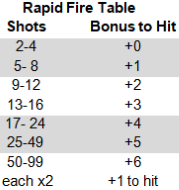
Rapid Fire Table
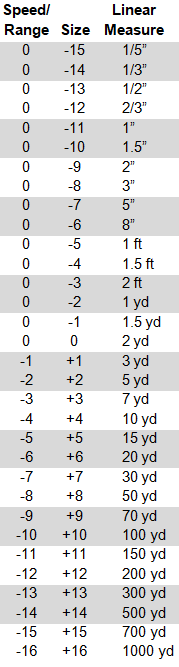
GURPS Speed/Range Table
To turn on the custom modifiers and button to open the Roll Modifier dialog box goto the Sheet Options tab and check off the tools you would like to user under Skill Modifier Tools section.
For an Armor Divisor: A number in parenthesis after
the damage - eg. (2) - is an armor divisor.
Enter this number in the Damage Notes as AD(#) or as
Armor Divisor(#).
ex: indicates the attack causes an explosion.
[#d]: indicates the attack causes fragmentation.
See B269. Enter in the Damage Notes
Abbr Name
aff Affliction
burnBurning
cor Corrosion
cr Crushing
cut Cutting
fat Fatigue
imp Impaling
pi- Small Piercing
pi Piercing
pi+ Large Piercing
pi++Huge Piercing
specSpecial
tox Toxic
Acc
Range. See B269.
Rate of Fire
The maximum number of shots that can be fired in
one turn (by a regular person).
The minimum number of shots is 1.

!: minimum RoF is 1/4 of the maximum, rounded up.
mxn: fires the first number of shots, which each then
split into the second number (eg. shotguns)
Jet: shoots a continuous stream of fluid. See page 106.
The number of shots that can be fired before the
weapon must be reloaded.
The parenthetical number indicates the number of 1
second ready maneuvers required to reload the
weapon.
T: the weapon is thrown. To "reload" it, pick it up.
i: you must load the shots individually. the listed
time is for each shot.
Move and Attack: If you are making a ranged attack,
you have a penalty of -2 or the weapon’s Bulk rating,
whichever is worse (B365, B469, B548).
Close Combat: If using a ranged weapon, ignore the usual
speed/range penalty and apply the weapon’s Bulk
statistic as a penalty to hit. B391
It also serves as a penalty to Holdout skill when you
attempt to conceal the weapon. B370
When firing at RoF 2+, every full multiple of Rcl
by which you make your attack roll means you score
one extra hit, to a maximum number of hits equal
to total shots fired. See page 373.
| Skill |
Enter a modifier to apply to any rolls on the this table.
Use the pencil/paper icon to select modifiers.
NOTE: Changing the modifier or check status of Max skill of 9 will clear modifiers used by dialog box.
The effective skill cannot exceed 9.
Notes
Maneuver:
Hit Location:
Traits:
Summary:
Copy/paste the Skill or Spell Row ID to link that skill to this technique.
When the skill/spell is updated, the technique's parent name and base skill level
will be updated.
Once entered, this will change the Skill/Spell for this particular attack to match
the skill/spell level of the Base Skill. Do not change this skill Level number manually.
Enter the net value of all modifiers combined.
Can be a positive or a negative number.
Example: Enter 2 for Weapon’s Bond (+1) plus Magic (Accuracy: +1).
Once entered, this will change the Skill/Spell Level for this particular
weapon to match the Base Skill/Spell level plus this MOD (Modifier).
Do not change this level number manually.
Name: Level:
Examples:
+1 from Talent...
+1 from Default Skill...
+1 from Enchanted Item with...
Malfunction is an Optional Rule. B278, B279, B382, tables B407 & HT179, with more detailed info HT79-81. If the option Use Malfunction is
checked [see Sheet Options page], and if the # entered here is greater than 0, then the roll result will check for weapon malfunction.
Malfunction has "priority" over a critical miss: if both would occur, only the malfunction takes place. See Critical Misses B382.
If Verify is checked, then roll again to verify the malfunction. see HT79
Divide the target's armor DR by this number before subtracting damage
or (adding it adding it to the HT roll for an affliction). See B268.
Explosive attacks (optional house rule: area effect attacks) only apply divisor to target of direct hit. See B269.
Afflictions divide the armor DR before determining bonus to HT roll. See B269
Hint: Enter inline rolls for additional results. To show the selected arrow.
Example: Arrow: ?{Arrow Type|Bodkin|Normal}
Hint: Enter inline rolls for additional results.
Example: Does an additional [[1d6]] fire damage.
Thrown (lbs)
Based on Striking ST
Note: future versions will add ability to choose ST source or enter ST.
Strength Modifier to distance only
Throwing or Throwing Art at DX Level = +1 ST
Throwing or Throwing Art at DX+1 Level = +2 ST
Super Throw Level
Each level of Super Throw, double range.
Each level of Super Throw increases damage by +2 per die.
Final damage based on ST, super throw, and damage modifier.
Bonus or penalty per die
Throwing Art at DX Level = +1 per die
Throwing Art at DX+1 Level = +2 per die
Abbr Name
aff Affliction
burnBurning
cor Corrosion
cr Crushing
cut Cutting
fat Fatigue
imp Impaling
pi- Small Piercing
pi Piercing
pi+ Large Piercing
pi++Huge Piercing
specSpecial
tox Toxic
Acc
Gravity, affects throwing distance. See B350.
See GURPS Campaigns Page 355 for formula
Rate of Fire
The maximum number of shots that can be fired in
one turn (by a regular person).
The minimum number of shots is 1.

!: minimum RoF is 1/4 of the maximum, rounded up.
mxn: fires the first number of shots, which each then
split into the second number (eg. shotguns)
Jet: shoots a continuous stream of fluid. See page 106.
The number of shots that can be fired before the
weapon must be reloaded.
The parenthetical number indicates the number of 1
second ready maneuvers required to reload the
weapon.
T: the weapon is thrown. To "reload" it, pick it up.
i: you must load the shots individually. the listed
time is for each shot.
When firing at RoF 2+, every full multiple of Rcl
by which you make your attack roll means you score
one extra hit, to a maximum number of hits equal
to total shots fired. See page 373.
| Skill |
Weapon Notes
Hint: Enter inline rolls for additional results.
Example: Does an additional [[1d6]] fire damage.
Range Calculator
Distance between shooter and target.
See B372-373
(2 mph = 1 yard/second).
Ignore if human like target moving 10 yards or less.
See B372-373
Elevation. If you're above the target, enter a positive number of hexes. If you're below the target, enter a negative number of hexes. See B407.
Effective speed/range based on range, speed, and elevation.
Accuracy
Each turn after the initial aim, you get an additional bonus. See B364
Rate of Fire
The maximum number of shots that can be fired in
one turn (by a regular person).
The minimum number of shots is 1.

!: minimum RoF is 1/4 of the maximum, rounded up.
mxn: fires the first number of shots, which each then
split into the second number (eg. shotguns)
Jet: shoots a continuous stream of fluid. See page 106.
Size Modifier of target.
Hit Mod
 
Apply this modifier to the ranged Modifier box and Roll Modifiers tool.
Close Range Shotgun Damage Tool
DMG
RoF
Type
Enter half-damage range of shotgun.
Close range.
New Rate of Fire
New Damage
Damage Resistance Multiplier.
 
 
Enter the stats of the shotgun, be sure to use half-damage range. The tool will calculate how close you need to be with the shotgun, the RoF, close range damage, and DR multiplier. For more information, see B409.
Falling and Collision
 
Yds Fallen
Gravity
Atmosphere
If collision, use relative velocity.
Head-on collision = Add velocity of both objects
Rearend collision = Faster object - slower object
Side collision = Speed of object causing collision
Hit Points of falling object or object initiating
collision.
If hitting immovable object, use HP*2
NOTE: If collision, if the other object is moving
it will inflict its own damage to object that initiated
the collision.
See B430
Damage
 
 
Falling
Collision


Demolition
 
Select an explosion type to use. This will populate Type and REF fields.
Type
Refer to the REF table B415.
Relative Explosive Force, equivalence in pounds of TNT.
TNT = 1.0. See B415.
Weight in pounds required by its REF.
Base damage role. Rules as written is 6d6.
 
Damage Multiplier:
Enter the number to multiply 6d6 by.
An explosion doing 6dxn damage takes (nxn)/4 pounds of TNT.
NOTE: Anyone caught in a blast may attempt an active defense
roll to dive for cover from the explosion’s collateral damage and
fragmentation; see Dodge and Drop B377.
Radius of collateral damage. See B414
For instance, if an explosion does 6dx2 damage,
everyone within 24 yards is vulnerable.

For fragmentation damage, the radius is
5 x dice of fragmentation damage.
Divisor. Amount to divide damage by based on
distance from blast. See B414
You can enter: 3 (default), 2, or 1.
Default: Damage rolled / (3 x distance blast).
Damage Modifiers Explosion, see B104.
Exp. +100% = Damage rolled / (2 x distance from blast).
Exp. +150% = Damage rolled / (1 x distance from blast).
Target's distance from center of blast.
Damage / (3 x distance from blast). Round down.
See B414
 
 
Determine how much explosive to use based on damage. TNT = 1.0
See B415.
X
Determine how big the explosion is based on weight.
See B415.
X
Fragmentation damage.
See B415.
Base skill level for a fragmentation damage to hit a target.
A hit is automatic if the explosive attack actually strikes the target.
Only three modifiers apply: the range modifier for the distance from the center
of the blast to the target, the modifier for the target’s posture (prone, etc.),
and the target’s Size Modifier. It is possible for several fragments to hit! For
every three points by which the attack roll succeeds, one additional fragment
strikes the target.
Quick Inventory
Inventory
Location
TL
Legality Class B267.
Reference to book and page numbers.
Examples:
B238 = GURPS Basic, Page 238
PU2:126 = Power-Ups 2. Page 126
Carried
Is the item being carried at the moment?
#
$
W
$+
W+
Notes
Standard gravity is based on 1G, earth normal.
If gravity is over 1G, then add your weight and encumberance then multiply by Gravity - 1. Add this value to your encumbrance.
If gravity is less than 1G, multiply the weight of your gear by the Gravity value, this is your new encumbrance.
See B350.
Total monetary value of all items (carried or not).
Total weight of all items carried.
Grand total of PC's weight: , and all items carried.
Spells Based on:
Magery/PI/Bonus Level:
Spell skill penalty based on number of ON spells.
Number of spells ON: .
NOTE: Use the options tab to adjust the penalty per spell ON.
Concentration spell penalty
Number of spells: 0.
NOTE: Use options tab to adjust the penalty.
To turn on the custom modifiers and button to open the Roll Modifier dialog box goto the Sheet Options tab and check off the tools you would like to user under Skill Modifier Tools section.
Skill level with spell
Difficulty
Modifier applied to skill level.
Can be a positive or a negative number.
Examples include a bonus from a Talent,
default from another Skill or Technique,
a piece of equipment, or a Perk.
Points
Enter a 1 or more to mark the spell as ON
skill penalty for each spell that is ON.
See B238 or M10.
Click one at a time, wait until each penalty is applied before clicking the next one.
Enter a 1 or more to mark the spell as Under Concentration.
skill penalty for each spell.
See B238 or M10.
Click one at a time, wait until each penalty is applied before clicking the next one.
Resisted By
Duration of Spell
Energy cost for casting the spell.
Amount of time to cast the spell.
Energy cost to maintain the spell.
Enter a modifier to apply to any rolls on the this table.
Use the pencil/paper icon to select modifiers.
NOTE: Changing the modifier or check status of Max skill of 9 will clear modifiers used by dialog box.
The effective skill cannot exceed 9.
Notes
Traits:
Summary:
The row id can be used with macros.
NOTE: Future use for linking to techniques
and combat skills.
Example field name: repeating_skills_[the row id]_level
This example would represent the skill level on that row.
Reference to book and page numbers.
Examples:
B238 = GURPS Basic, Page 238
PU2:126 = Power-Ups 2. Page 126
Reason for MOD (Modifier):
Spell class; Area, Blocking, Information, Melee,
Missile, Regular, Regular (Jet), Resisted, Special
Primary College:
Secondary College:
Success, critical success, fail, and critical fail
notes will be added to roll results.
You can add macros to these notes.
The width of these note boxes are set to help you
visualize what it will look like in chat.
Show notes below in roll template
Show Spell Modifier notes (see actual spell description)
Success Note:
Critical Success Note:
Fail Note:
Critical Fail Note:

Latest Changes: Updated

Point Summary

One of the most commented part about this character sheet is the Point Summary which does not correspond to GCA nor GCS, and for that matter - any manual process. Because of this, we have made a major change to the way the Point Summary totals are shown on the General page. This is to take make it much easier for users of GCA and GCS to compare the points allocated in GCA /GCS to their input into this sheet. To take advantage of these changes you will have to make some manual changes to your existing PCs.

Under Traits:

  • Copy/Paste your current Perks that you have under Advantages and Quirks under Disadvantages, to their newly created Repeating Sections respectively.
  • Verify/Create or Copy/Paste your Racial Traits to its associate Repeating Section if you haven’t already.
  • Appearance has been moved to the Bio/Misc page. The drop down is still there BUT the points have been removed. You need to manually enter those points in the appropriate Traits Repeating Section.
  • Verify your Point Summary now under your chosen format of GCA or GCS. Those that do not use either application should use the format they like best.

Suggestions

    Please note: I, Mike W, and MadCoder are not one of the original authors of this sheet. All we have done is to fix a number of small issues, changed some formatting, and implemented some suggested changes. The basic functionality of the sheet has remained the same.

    To report any Issues or a Suggestion, please use the Roll20 forum under Character Sheets & Compendium. I have created a thread named: [GURPS] - Sheet #1 - Thread 1 (that seems to be similar to the naming convention used by other sheets).

    https://app.roll20.net/forum/post/6616836/gurps-number-1-thread-1/

    In your post, please specify if it is an Issue or Suggestion with as much detail information as possible. Screen shots help a lot! I am just learning to work with HTML and CSS so I may not be able to do everything requested. I make no promises on how fast I may be able to implement a Fix or a Suggestion - so please be patient. -Thanks, Mike W.

    If there are others that are working on or wish to work on this sheet, lets coordinate using the Roll20 forum for now - perhaps later we can use GitHub.

Version:

Pull Request:

  • Internationalization updates.
    • Minor change to Tabs. The Width will adjust according to the title length. In other languages the length may be longer. Reported by Paulo.
    • Several changes and corrections to the sheet, to provide a way to translate fields that were not possible before.
    • Fixed bug that changed combat entries switched from being based on skills to being based on DX. Reported by Philip W..
  • Bug fix in container "turning and velocity modifiers". Values are incorrect when the current move has the step in parentheses. Reported by Paulo.
  • Bug fix in roll template. The notes are shown even if the option "Show Skill Modifier notes (refer to the current skill description)" is not checked. Reported by Paulo.
  • Bug fix in perception button. When the Private option is marked, the only place that does not work is the Perception. Reported by Paulo.
  • Bug fix. When entering a value other than F or U under the INFO column, the text box was not being cleared. Reported by Paulo.

Version: 2.6.6

Pull Request: 3/17/2021

  • GCA Import Bug Fix. With the help of Gata, The Fabulous Iron Chef, and a discord user I was able to find a bug related to multiple attack modes.

Version: 2.6.5

Pull Request: 3/15/2021

  • GCA Import Bug Fix. This could have prevented a language from importing correctly.
  • Updated tooltip text for Unstun (aka Recover from stun) and death check. Suggestions provided by Justin. S.
  • Fix display of Chat box roll results for Modifier when character sheet sytle is assigned to Fabric. Reported by Jared.

Version: 2.6.4

Pull Request: 2/22/2021

  • Bug fix for Roll Options. If you selected Private Roll, the next time the sheet opens, it changed the option to Custom Roll. Reported by PL M.
  • Chat Box, update display of Armor Divisor when rolling damage to use the same style as skill. Reported by Jared.
  • GCA Import bug. Added some error checking to try to capture null data values for an advantage. Reported by Bob G.
  • Combat Location Tab. Added character and campaign settings options to update Current Hit Points when location damage is changed.

Version: 2.6.3

Pull Request: 2/15/2021

  • Added optional Header Buttons for selecting the modifier types for for skill rolls. Option can be selected on the sheet and campaign options.
  • GCA Import, modifier notes. Updated import to handle cases modifiers of modifiers for a advantage/disadvantage. Reported by Valter
  • GCA Import, fixed bug incorrect wealth level name.
  • GCA Import, added more rules to capture frequency of appearance and self-control rolls for advantages/disadvantages.

Version 2.6.2

Pull Request: 2/1/2021

  • Bio\Misc tab. Added Apply checkbox for Size Modifier. If checked, the Size Modifier will change the required character points for Strength and Hit Points. If you spent too many character points on Strength, you will get a warning message.
  • GCA Import. If character has Size Modifier 1 or higher, the Apply Size Modifier will be checked.
  • Combat Tab. Moved Shotgun damage tool to the Ranged sub-tab.
  • Combat Tool for Melee. Updated Size Modifier to use relative Size Modifier. Relative Size Modifier is Target Size - Your Size.
    • Requested by Charles and confirmed by PL M as addendum rule on FAQ site.
    • See: http://www.sjgames.com/gurps/faq/FAQ4-3.html#SS3.4.2.23
  • Chat Roll Options. Added a campaign setting and sheet option to display Public and Private roll options in the header. Added an optional Custom roll options.
    • Note: The custom option requires an API script that can intercept the roll template.
    • For an example, see the Blind Roll API script, https://app.roll20.net/forum/permalink/5064809/

Version: 2.6.1

Pull Request: 1/9/2021

  • Fix spelling error for drowsy. Reported by Charles
  • Fix bug with checkbox Show casting details on roll template:. The bug was if checked no roll is made, if unchecked the roll is made. Reported by Charles.
  • Fix bug for mini-roll modifier tool. If Encumbrance level changed, the total may not calculate correctly. Reported by PL M.
  • Fix but with range calculator. Math error calculating total distance when firing up. Reported by Idle

Version: 2.6.0

Pull Request: 1/4/2021

  • Options tab. Created sub-tabs for Sheet Options, Rules, Import
  • Added GURPS Character Assistant Importer.
  • Added Knockback as a damage type.
  • Repeating Ranged Table. Fixed Malfuction Verify alignment.
  • Repeating Melee and Ranged Tables. Added new field in expanded notes for Armor Divisor. If higher than 1, the AD will show on damage rolls.

Version: 2.5.4

Pull Request: 12/09/2020

  • Melee and Ranged weapon tables. Added new tool to turn on option to use a selected token or target a token. This might allow more advanced features when using the Roll20 API.
  • Roll Modifier Tool. Added a reset button and a note icons to view the summary of the roll modifiers.
  • Roll Modifier Tool. Added a checkbox to apply encumbrance penalty skills, techniques, and active defenses.
  • Roll Modifier Tool for Defense. Added drop-down to apply Shield DB and Magic DB to active defenses.
  • Combat tab > Defense. Added option to display Defense Bonus Notes on roll result table. Requested by Charles.
  • Roll Modifier Tool. Melee Attacks. Added Flurry of Blows and Might Blow. Requested by Hypnobeard

Version: 2.5.3

Pull Request: 11/30/2020

  • Urgent bugfix. Remove target option from melee button.
  • Combat Tab > Melee table. Display swing & thrust damage, also widened the damage column a little to make easier to enter field values and formulas. Requested by PL M.
  • Combat Tab. An Active Defense can now be linked to a melee weapon. This allows you assign a defense to melee weapon that has additional skill bonuses, like weapon bond.
  • New Rolltemplate. A generic, simple template for use with macros. See below.
Rolltemplate for Macros
Example Macro
&{template:macro} {{templateType=dnd5e}} {{sheetStyle=4}} {{roll=[[3d6]]}} {{target=[[13]]}} {{title=Drake}} {{subtitle=Attacks Orc}} {{Damage=[[1d6-1]] crush}} {{Location=[[3d6]]}} {{Note=Groin shots don't count}} {{desc=**Roll** HT-2 to avoid stun. If stunned roll HT each turn to recover.}}
  • templateType = basic | dnd5e | pathfinder.
  • sheetStyle = #. Matches the Sheet Style drop-down option on the character sheet.
    • 0 = Green
    • 1 = Blue
    • 2 = Beige
    • 3 = Gray
    • 4 = Classic White
    • 5 = Pastel Pink
    • 6 = Pastel Earth
    • 7 = Purple
    • 8 = Fabric
  • title = Main title
  • subtitle = Sub Title
  • desc = Description, full-width, placed at the bottom of the template.
  • roll = Macro for making a die roll.
  • target = Skill level for the die roll. If it exists in the macro, then it will appear to the right of the roll result.
  • All other properties will be automatically added to the template as key/value pairs. Key = Label, Value = displayed in second column.
    • Example: {{note=This is a test}}
    • note is the key and would populate the first column.
    • This is a test is the value would populate the second column.
    • Important The key would need to be a single word, no spaces.

Version: 2.5.2

Pull Request: 11/17/2020

  • Current Move Bug. Fix issue where current move wasn't updated when inventory total changes. Reported by Adam .
  • Combat Tab > Defense Sub-tab > Roll Modifier Tool. Add Defense Bonus modifier.
  • Bugfix: Roll template Pastelle Pink not showing correctly for rolls and dex rolls. Reported by Ian.
  • New Sheet and Campaign Option: Show casting details on roll template. If checked, detailed notes like casting time, duration, cost, maintain, resisted by, and class will be shown on the roll results template.

Version: 2.5.1

Pull Request: 10/27/2020

  • Combat tab > Defense. Increased the width of the original Hit Location table. Requested by PL M.
  • Combat tab > Damage sub-tab.
    • Add: Major wound field and tooltip.
    • Add: When updating HP Divisor for a hit location update the Disabled HP column.
    • Add: Add a Notes box, could be used to enter notes for Unliving, Homogenous, Diffuse, etc.
    • Revision: Updated tooltip for Layer armor. Added notes on how to identify armor as Hardened.
    • Renamed Type to Template.
    • Bugfix: When updating Max Hit Points the penalty for a hit location may be set to nothing or set to repeating zeros.
    • Bugfix: When changing size modifier, fix bug where penalty for a hit location did not total correctly.
  • Combat tab > Range
    • Move Thrown table just below repeating ranged weapons. If using Modifier dialog box, modifiers are now applied to thrown table.
    • Range Calculator. Added ACC and ROF to the table. Added button that can be applied to the modifiers and roll modifier dialog box.

Version: 2.5.0

Pull Request: 10/20/2020

  • Combat tab: First iteration of Combat sub tab. This tab contains a hit location table and layored armor. You can select a hit location type and update the table. There are options for how many layers to display and if you want to use a back armor location.

Version: 2.4.0

Pull Request: 10/13/2020

  • Combat tab: Added sub tabs for Defense, Melee, Ranged, and Tools. Preliminary updates to improving Damage and Armor sections.
  • Combat tab -> Combat Tools: Remove redundant elevation direction, replaced by simple elevation field, if you're above the target, enter a positive number. If below the target, enter a negative number.
  • Gravity Field. Added a gravity field that can be applied to jumping distance and total inventory weight. Note: Gravity value can be updated in three places; Combat Tab -> Tools, Thrown Weapon. Inventory Tab on the totals line. General tab under the Jumping feat.

Version: 2.3.12

Pull Request: 9/29/2020

  • Roll Modifier Tool. Added an Encumbered modifier, useful skills like Stealth, that may be affected by encumbrance level. Based on original suggestion by Ian.
  • Roll Modifier Tool. Added modifiers that can be applied to spells.
  • Performance Improvement. Refactored events for Spells, Techniques, and Skills that should improve responsiveness.
  • If a new character sheet is created, the latest announcements will not be displayed.
  • Bug fix - General Tab. Fix calculation errors for Turning and Velocity Modifiers
  • Bug fix. Remove mystery characters, $[[3]] that was added to all the translation files for the modifier label translation.

Version: 2.3.11

Pull Request: 9/22/2020

  • Roll Modifier Tools. First Iteration.
    • New Sheet Options under the section titled Skill Modifier Tool.
    • If checked, a custom modifier and action button will appear above a section of skills.
    • You can enter a modifier or click the action button to open a dialog box.
    • Max skill of 9 will limit your skill level to 9 or the modified skill that is less than 9.
    • Action button will open the Roll Modifiers box. You can enter own custom modifiers or check the ones that apply.
    • The modifiers can be helpful for new players and GMs.
    • There are a new set of campaign Game Settings to turn on the tools by default.
    • Roll Modifiers Dialog Box: Enter and/or select options. If ready, click the apply button. When make a roll, you will see the summary of modifiers on the roll results table.
  • Added new character sheet and campaign option to turn on/off minimum damage notes. Requested by The Fabulous Iron Chef.
  • Bug fix. Refactored how items linked to spells, skills, techniques, or attributes are updated. If you had multiple character sheets open, certain conditions would create empty rows for techniques, melee attacks, or range attacks.
  • Bug fix. Resolved a number javascript and html warning messages, which was only visible if viewing developer tools.

Version: 2.3.10

Pull Request: 7/9/2020

  • Bio\Misc Tab. Calculate Reach based on Size Modifier.
  • General Tab - Current Move table. Added the step disance for each movement type.
  • Grimoire Tab - Repeating Spells. Changed the checkboxes for ON and CT to input boxes, since a person can cast the same spell more than once.

Version: 2.3.9

Pull Request:

  • Combat tab. Active Defenses - Link to an attribute and calculate the base defense.
  • Combat tab. Knockback Defenses - Link to an attribute and calculate the base defense. Added a field to adjust the HP per yard amount.
  • Repeating Defense, Melee, and Ranged tables. Added ability to link a skill to WILL.
  • Fixed text description for Unconsciousness check, changed Hard to Kill to Hard to Subdue. Reported by Ben.

Version: 2.3.8

Pull Request: 6/30/2020

  • Combat tab. Added Knockback save as an active defense.

Version: 2.3.7

Pull Request: 06/09/2020

  • Rolltemplate, Fabric sheet. Fixed display issue, reported by Ian.
  • Repeating Techniques, melee attacks, and ranged attacks can be linked to ST, Striking ST, DX, IQ, HT, or 10.
  • Traits Tab. Added a level column for repeating advantages, disadvantages, and racial traits.

Version: 2.3.6

Pull Request: 06/02/2020

  • Rolltemplate results now match the selected sheet style, contributed by TamedFlame.
  • Text areas size can be resized in the browser but this caused overlapping issues. Reported by eVie fixed by TamedFlame.
  • Skills Tab. Expanded notes area. Added new text box to enter Skill Modifier notes normally found in the description of the skill. Added highlight row checbox.
  • Grimoire Tab. Changes College(s) to two text boxes; Primary College and Secondary College. Widened the text box for Reason for Mod (Modifier).
  • Rolltemplate Ranged Attack Notes to help clarify rules. If failed by 10 or more, a note will show that critical miss doesn't apply to ranged attacks.
  • Inventory table. Add a location column.

Critical Roll Options

Use rules as written
Only on a 3 or 4
Turn Off

Skill Modifier Options

Display Roll Modifier Options in Header If checked, the options for No Modifier Prompt, Single Modifier Prompt and Extended Modifier Prompts will be displayed to the right of the character name above the tabs.
No Modifier Prompt Rolls will be made immediately with no prompt.
Single Modifier Prompt Ask for a bonus or penalty to be added to dice rolls.
This will not affect damage rolls.

Extended Modifier Prompts Instead of a single modifier, rolls will ask for a series of modifiers,
to remind you about potential bonuses/penalties.
This will not affect damage rolls.

Skill Modifier Tools

Use Skill Modifier Tool Displays a modifier text box, a button to open a tool to modify effective skill, and to check off Max skill of 9.
Use Technique Modifier Tool Displays a modifier text box, a button to open a tool to modify effective skill, and to check off Max skill of 9.
Use Defense Modifier Tool Displays a modifier text box, a button to open a tool to modify effective skill, and to check off Max skill of 9.
Use Melee Attack Modifier Tool Displays a modifier text box, a button to open a tool to modify effective skill, and to check off Max skill of 9.
Use Ranged Attack Modifier Tool Displays a modifier text box, a button to open a tool to modify effective skill, and to check off Max skill of 9.
Use Spell Modifier Tool Displays a modifier text box, a button to open a tool to modify effective skill, and to check off Max skill of 9.

Public or Private Rolls

Display Roll Options in Header If checked, the options for Public Rolls and Private Rolls will be displayed to the right of the character name above the tabs.
Display Custom Option in Header If checked, button name for Custom Rolls will be displayed to the right of the character name above the tabs.
Public Rolls All players will be able to see
your skill level, roll and results.

Private Skill Levels deprecated Only the GM will be able to see
your skill level, but all players
will see the result.
NOTE: This now behaves just like Private Rolls

Private Rolls Only the GM will see your skill
level and the result.

Custom Rolls Use this option to use a custom macro with the Roll Template.

Important: When entering the macro, be sure to add a space character to the end!

Add a Button Label to display a button in the header.

For example, the Private Rolls option adds /w gm to the beginning of the roll, which means whisper to GM.

Another example is adding a blind roll option, where only the GM sees the roll. This example uses the Blind Roll API script, see https://app.roll20.net/forum/permalink/5064809/.
Set Label = Blind Roll, set Macro = !broll
Button Name
Macro NOTE: In order to use this option, you will need an API script that can intercept the data for the roll and then send a message to the GM.

For an example, see the Blind Roll API script, https://app.roll20.net/forum/permalink/5064809/

Repeating Technique Tables

Show Original Show the original techniques table.
Show Revised Show the revised techniques table.

Point Summary Layout

GCA GURPS Character Assistant.
GCS GURPS Character Sheet.
Detailed Custom view displaying each section total.
Including the deprecated Misc. Points box.
Enter Unspent Points Check if you would like to manually track your unspent points

Add to combat tracker

Public Speed Tracker Show basic speed and add to Chat message to public.
Private Speed Tracker Show basic speed and add to Chat message to GM.

Spell Options (See B238, M10)

Penalty for each spell ON:
Penalty for each spell Concentrated On:
Show casting details on roll template:

Active Defenses

Show Active Defenses RAW Notes Show Rules as Written Success/Fail notes

Damage Table

Update Hit Points If checked, when applying damage to a location, current Hit Points is updated.

Damage Dice Icon

Use Malfunction If checked, roll results will check for malfunction.

Stat Modifier Options

Mods to attributes increase all derived stats (including HP, FP)
Mods to attributes increase most derived stats (not HP, FP)
Mods to attributes do not increase derived stats

Sheet Style

Selects a visual style for the character sheet

Falling & Collision Damage Notes

Demolition Damage Notes

Fragmentation Skill Notes

Fragmentation Damage Notes

Fragmentation Recoil:

Spell Critical Success Notes

Spell Fail Notes

Spell Critical Failure Notes

Minimum Damage Notes

Show notes in roll template

Editable Wound Modifier Notes

Initial wound modifier notes based on GURPS 4th Edition - Campaigns
Show notes in roll template
Type Notes
Cutting
Impaling
Crushing
PI-
PI
PI+
PI++
Affliction
Burn
Corrosion
Fatigue
Toxic
Special
Knockback

Import Tool [BETA]

Initial version is designed for a one time import. Future iterations will allow re-import and adding GURPS Character Sheet (GCS).

GCA Import

  1. Export your character sheet to an XML file.
    • File > Export ... > Check Export XML File.
  2. Convert the XML file to json.
    • https://convertxmljson.com/
    • https://jsonformatter.org/xml-to-json
    • Initial testing worked with both sites. Alert if you use a different one make sure it doesn't create fields named __cdata
  3. Copy/Past the json data to the text box below.
  4. Press the [Import CGA] button
  5. Wait for the process to complete.
  6. Review the sheet and notify the Forum of any errors or feature requests.

JSON DATA

Import notes into Bio\Misc fields and into Notes textboxes for repeating tables.

Alert

Since the JSON data is large, please only press the button once. Then wait for the Processing... message to show. It might take more than 5 to 10 seconds to run, depending on your processing power. If the Processing... doesn't disappear after 20 seconds or so, then something probably broke during the import.

{{characterName}}
{{skillName}}
BASE: {{basicSpeed}}
{{#type}} {{/type}} {{#selected}} {{/selected}} {{#target1}} {{/target1}} {{#rollResult}} {{/rollResult}} {{#effectiveSkill}} {{/effectiveSkill}} {{#rollTotal() useModToll 1}} {{#maneuver}} {{/maneuver}} {{#allOutAttack}} {{/allOutAttack}} {{#hitLocation}} {{/hitLocation}} {{#rollTotal() maxNine 1}} {{/rollTotal() maxNine 1}} {{#rollTraitSummary}} {{/rollTraitSummary}} {{#rollModifierSummary}} {{/rollModifierSummary}} {{/rollTotal() useModToll 1}} {{#rollResult}} {{#spellRoll}} {{/spellRoll}} {{/rollResult}} {{#useMalfunction}} {{#rollGreater() malfunction 0}} {{#rollBetween() rollResult malfunction 18}} {{/rollBetween() rollResult malfunction 18}} {{/rollGreater() malfunction 0}} {{/useMalfunction}} {{#damageRoll}} {{#rollTotal() showMinimumDmgNote 1}} {{#minDamageNote}} {{/minDamageNote}} {{/rollTotal() showMinimumDmgNote 1}} {{/damageRoll}} {{#rollGreater() armorDivisor 1}} {{/rollGreater() armorDivisor 1}} {{#rollTotal() useDamageTypeNotes 1}} {{#damageTypeNote}} {{/damageTypeNote}} {{/rollTotal() useDamageTypeNotes 1}} {{#rollTotal() showNotes 1}} {{#notes}} {{/notes}} {{/rollTotal() showNotes 1}} {{#rollTotal() showDBNotes 1}} {{#DBNotes}} {{/DBNotes}} {{/rollTotal() showDBNotes 1}} {{#rollTotal() showCastingDetails 1}} {{#rollTotal() showSpellNotes 1}} {{#spellNotes}} {{/spellNotes}} {{/rollTotal() showSpellNotes 1}} {{#castingTime}} {{/castingTime}} {{#castingDuration}} {{/castingDuration}} {{#castingCost}} {{/castingCost}} {{#castingMaintain}} {{/castingMaintain}} {{#castingResist}} {{/castingResist}} {{#castingClass}} {{/castingClass}} {{/rollTotal() showCastingDetails 1}} {{#recoil}} {{/recoil}} {{#rollTotal() noteBoxOneShow 1}} {{#noteBoxOneContent}} {{/noteBoxOneContent}} {{/rollTotal() noteBoxOneShow 1}} {{#rollTotal() noteBoxTwoShow 1}} {{#noteBoxTwoContent}} {{/noteBoxTwoContent}} {{/rollTotal() noteBoxTwoShow 1}} {{#rollTotal() noteBoxThreeShow 1}} {{#noteBoxThreeContent}} {{/noteBoxThreeContent}} {{/rollTotal() noteBoxThreeShow 1}} {{#rollTotal() noteBoxFourShow 1}} {{#noteBoxFourContent}} {{/noteBoxFourContent}} {{/rollTotal() noteBoxFourShow 1}}
{{characterName}}
{{skillName}}
Type: {{type}} {{#bookReference}} Ref: {{bookReference}} {{/bookReference}}
Selected: {{selected}}
Target 1: {{target1}}
Roll: {{#rollTotal() rollResult 18}} {{rollResult}} {{#showHitLabel}}Critical Miss{{/showHitLabel}} {{#showSuccessLabel}}Critical Failure{{/showSuccessLabel}} {{#rawCriticalFailNote}}

{{rawCriticalFailNote}}

{{/rawCriticalFailNote}} {{#customCriticalFailNote}}

{{customCriticalFailNote}}

{{/customCriticalFailNote}}
{{/rollTotal() rollResult 18}} {{#rollTotal() rollResult 17}} {{rollResult}} {{#rollLess() effectiveSkill 16}}Critical{{/rollLess() effectiveSkill 16}} {{#showHitLabel}}Miss{{/showHitLabel}} {{#showSuccessLabel}}Failure{{/showSuccessLabel}} {{#rollGreater() effectiveSkill 15}} {{#rawFailNote}}

{{rawFailNote}}

{{/rawFailNote}} {{#customFailNote}}

{{customFailNote}}

{{/customFailNote}} {{/rollGreater() effectiveSkill 15}} {{#rollLess() effectiveSkill 16}} {{#rawCriticalFailNote}}

{{rawCriticalFailNote}}

{{/rawCriticalFailNote}} {{#customCriticalFailNote}}

{{customCriticalFailNote}}

{{/customCriticalFailNote}} {{/rollLess() effectiveSkill 16}}
{{/rollTotal() rollResult 17}} {{#rollBetween() rollResult 3 4}} {{rollResult}} {{#rollLess() useCriticalPlusTen 2}}Critical{{/rollLess() useCriticalPlusTen 2}} {{#showHitLabel}}Hit{{/showHitLabel}} {{#showSuccessLabel}}Success{{/showSuccessLabel}} {{#rollTotal() useCriticalPlusTen 2}} {{#rollTotal() showRawDefenseNotes 1}} {{#rawSuccessNote}}

{{rawSuccessNote}}

{{/rawSuccessNote}} {{/rollTotal() showRawDefenseNotes 1}} {{#customSuccessNote}}

{{customSuccessNote}}

{{/customSuccessNote}} {{/rollTotal() useCriticalPlusTen 2}} {{#rollLess() useCriticalPlusTen 2}} {{#rollTotal() showRawDefenseNotes 1}} {{#rawCriticalSuccessNote}}

{{rawCriticalSuccessNote}}

{{/rawCriticalSuccessNote}} {{/rollTotal() showRawDefenseNotes 1}} {{#customCriticalSuccessNote}}

{{customCriticalSuccessNote}}

{{/customCriticalSuccessNote}} {{/rollLess() useCriticalPlusTen 2}}
{{/rollBetween() rollResult 3 4}} {{#rollBetween() rollResult 5 16}} {{#rollGreater() rollResult effectiveSkill}} {{rollResult}} {{^rangedAttack}} {{#rollLess() effectiveSkill 4}} {{#rollGreater() rollResult 12}}Critical{{/rollGreater() rollResult 12}} {{/rollLess() effectiveSkill 4}} {{/rangedAttack}} {{^rangedAttack}} {{#rollTotal() effectiveSkill 4}} {{#rollGreater() rollResult 13}}Critical{{/rollGreater() rollResult 13}} {{/rollTotal() effectiveSkill 4}} {{/rangedAttack}} {{^rangedAttack}} {{#rollTotal() effectiveSkill 5}} {{#rollGreater() rollResult 14}}Critical{{/rollGreater() rollResult 14}} {{/rollTotal() effectiveSkill 5}} {{/rangedAttack}} {{^rangedAttack}} {{#rollTotal() effectiveSkill 6}} {{#rollGreater() rollResult 15}}Critical{{/rollGreater() rollResult 15}} {{/rollTotal() effectiveSkill 6}} {{/rangedAttack}} {{^rangedAttack}} {{#rollBetween() effectiveSkill 7 15}} {{#rollGreater() rollResult 16}}Critical{{/rollGreater() rollResult 16}} {{/rollBetween() effectiveSkill 7 15}} {{/rangedAttack}} {{#showHitLabel}}Miss{{/showHitLabel}} {{#showSuccessLabel}}Failure{{/showSuccessLabel}} {{#rangedAttack}} {{#rollLess() effectiveSkill 4}} {{#rollGreater() rollResult 12}}
Critical miss by 10 or more doesn't apply to ranged weapons. See B382
{{/rollGreater() rollResult 12}} {{/rollLess() effectiveSkill 4}} {{/rangedAttack}} {{#rangedAttack}} {{#rollTotal() effectiveSkill 4}} {{#rollGreater() rollResult 13}}
Critical miss by 10 or more doesn't apply to ranged weapons. See B382
{{/rollGreater() rollResult 13}} {{/rollTotal() effectiveSkill 4}} {{/rangedAttack}} {{#rangedAttack}} {{#rollTotal() effectiveSkill 5}} {{#rollGreater() rollResult 14}}
Critical miss by 10 or more doesn't apply to ranged weapons. See B382
{{/rollGreater() rollResult 14}} {{/rollTotal() effectiveSkill 5}} {{/rangedAttack}} {{#rangedAttack}} {{#rollTotal() effectiveSkill 6}} {{#rollGreater() rollResult 15}}
Critical miss by 10 or more doesn't apply to ranged weapons. See B382
{{/rollGreater() rollResult 15}} {{/rollTotal() effectiveSkill 6}} {{/rangedAttack}} {{#rangedAttack}} {{#rollBetween() effectiveSkill 7 15}} {{#rollGreater() rollResult 16}}
Critical miss by 10 or more doesn't apply to ranged weapons. See B382
{{/rollGreater() rollResult 16}} {{/rollBetween() effectiveSkill 7 15}} {{/rangedAttack}} {{#rollLess() effectiveSkill 4}} {{#rollLess() rollResult 13}} {{#rollTotal() showRawDefenseNotes 1}} {{#rawFailNote}}

{{rawFailNote}}

{{/rawFailNote}} {{/rollTotal() showRawDefenseNotes 1}} {{#customFailNote}}

{{customFailNote}}

{{/customFailNote}} {{/rollLess() rollResult 13}} {{#rollGreater() rollResult 12}} {{#rollTotal() defenseType 1}}

Lose your footing and fall prone. (B382)

{{/rollTotal() defenseType 1}} {{#rollTotal() defenseType 2}}

Roll on the appropriate Critical Miss Table B556. (B382). Apply the result immediately.

{{/rollTotal() defenseType 2}} {{#rollTotal() defenseType 3}}

You lose your grip on whatever you were Blocking with and must take a turn to ready it before you can use it to block again. (B382)

{{/rollTotal() defenseType 3}} {{#rollTotal() showRawDefenseNotes 1}} {{#rawCriticalFailNote}}

{{rawCriticalFailNote}}

{{/rawCriticalFailNote}} {{/rollTotal() showRawDefenseNotes 1}} {{#customCriticalFailNote}}

{{customCriticalFailNote}}

{{/customCriticalFailNote}} {{/rollGreater() rollResult 12}} {{/rollLess() effectiveSkill 4}} {{#rollTotal() effectiveSkill 4}} {{#rollLess() rollResult 15}} {{#rollTotal() showRawDefenseNotes 1}} {{#rawFailNote}}

{{rawFailNote}}

{{/rawFailNote}} {{/rollTotal() showRawDefenseNotes 1}} {{#customFailNote}}

{{customFailNote}}

{{/customFailNote}} {{/rollLess() rollResult 15}} {{#rollGreater() rollResult 13}} {{#rollTotal() defenseType 1}}

Lose your footing and fall prone. (B382)

{{/rollTotal() defenseType 1}} {{#rollTotal() defenseType 2}}

Roll on the appropriate Critical Miss Table B556. (B382). Apply the result immediately.

{{/rollTotal() defenseType 2}} {{#rollTotal() defenseType 3}}

You lose your grip on whatever you were Blocking with and must take a turn to ready it before you can use it to block again. (B382)

{{/rollTotal() defenseType 3}} {{#rollTotal() showRawDefenseNotes 1}} {{#rawCriticalFailNote}}

{{rawCriticalFailNote}}

{{/rawCriticalFailNote}} {{/rollTotal() showRawDefenseNotes 1}} {{#customCriticalFailNote}}

{{customCriticalFailNote}}

{{/customCriticalFailNote}} {{/rollGreater() rollResult 13}} {{/rollTotal() effectiveSkill 4}} {{#rollTotal() effectiveSkill 5}} {{#rollLess() rollResult 15}} {{#rollTotal() showRawDefenseNotes 1}} {{#rawFailNote}}

{{rawFailNote}}

{{/rawFailNote}} {{/rollTotal() showRawDefenseNotes 1}} {{#customFailNote}}

{{customFailNote}}

{{/customFailNote}} {{/rollLess() rollResult 15}} {{#rollGreater() rollResult 14}} {{#rollTotal() defenseType 1}}

Lose your footing and fall prone. (B382)

{{/rollTotal() defenseType 1}} {{#rollTotal() defenseType 2}}

Roll on the appropriate Critical Miss Table B556. (B382). Apply the result immediately.

{{/rollTotal() defenseType 2}} {{#rollTotal() defenseType 3}}

You lose your grip on whatever you were Blocking with and must take a turn to ready it before you can use it to block again. (B382)

{{/rollTotal() defenseType 3}} {{#rollTotal() showRawDefenseNotes 1}} {{#rawCriticalFailNote}}

{{rawCriticalFailNote}}

{{/rawCriticalFailNote}} {{/rollTotal() showRawDefenseNotes 1}} {{#customCriticalFailNote}}

{{customCriticalFailNote}}

{{/customCriticalFailNote}} {{/rollGreater() rollResult 14}} {{/rollTotal() effectiveSkill 5}} {{#rollTotal() effectiveSkill 6}} {{#rollLess() rollResult 16}} {{#rollTotal() showRawDefenseNotes 1}} {{#rawFailNote}}

{{rawFailNote}}

{{/rawFailNote}} {{/rollTotal() showRawDefenseNotes 1}} {{#customFailNote}}

{{customFailNote}}

{{/customFailNote}} {{/rollLess() rollResult 16}} {{#rollGreater() rollResult 15}} {{#rollTotal() defenseType 1}}

Lose your footing and fall prone. (B382)

{{/rollTotal() defenseType 1}} {{#rollTotal() defenseType 2}}

Roll on the appropriate Critical Miss Table B556. (B382). Apply the result immediately.

{{/rollTotal() defenseType 2}} {{#rollTotal() defenseType 3}}

You lose your grip on whatever you were Blocking with and must take a turn to ready it before you can use it to block again. (B382)

{{/rollTotal() defenseType 3}} {{#rollTotal() showRawDefenseNotes 1}} {{#rawCriticalFailNote}}

{{rawCriticalFailNote}}

{{/rawCriticalFailNote}} {{/rollTotal() showRawDefenseNotes 1}} {{#customCriticalFailNote}}

{{customCriticalFailNote}}

{{/customCriticalFailNote}} {{/rollGreater() rollResult 15}} {{/rollTotal() effectiveSkill 6}} {{#rollBetween() effectiveSkill 7 15}} {{#rollLess() rollResult 17}} {{#rollTotal() showRawDefenseNotes 1}} {{#rawFailNote}}

{{rawFailNote}}

{{/rawFailNote}} {{/rollTotal() showRawDefenseNotes 1}} {{#customFailNote}}

{{customFailNote}}

{{/customFailNote}} {{/rollLess() rollResult 17}} {{#rollGreater() rollResult 16}} {{#rollTotal() defenseType 1}}

Lose your footing and fall prone. (B382)

{{/rollTotal() defenseType 1}} {{#rollTotal() defenseType 2}}

Roll on the appropriate Critical Miss Table B556. (B382). Apply the result immediately.

{{/rollTotal() defenseType 2}} {{#rollTotal() defenseType 3}}

You lose your grip on whatever you were Blocking with and must take a turn to ready it before you can use it to block again. (B382)

{{/rollTotal() defenseType 3}} {{#rollTotal() showRawDefenseNotes 1}} {{#rawCriticalFailNote}}

{{rawCriticalFailNote}}

{{/rawCriticalFailNote}} {{/rollTotal() showRawDefenseNotes 1}} {{#customCriticalFailNote}}

{{customCriticalFailNote}}

{{/customCriticalFailNote}} {{/rollGreater() rollResult 16}} {{/rollBetween() effectiveSkill 7 15}}
{{/rollGreater() rollResult effectiveSkill}} {{#rollBetween() rollResult 5 effectiveSkill}} {{rollResult}} {{#rollLess() useCriticalPlusTen 2}} {{#rollTotal() useCriticalPlusTen 1}} {{#rollGreater() effectiveSkill 15}} {{#rollTotal() rollResult 6}}Critical{{/rollTotal() rollResult 6}} {{#rollTotal() rollResult 5}}Critical{{/rollTotal() rollResult 5}} {{/rollGreater() effectiveSkill 15}} {{#rollTotal() effectiveSkill 15}} {{#rollTotal() rollResult 5}}Critical{{/rollTotal() rollResult 5}} {{/rollTotal() effectiveSkill 15}} {{/rollTotal() useCriticalPlusTen 1}} {{/rollLess() useCriticalPlusTen 2}} {{#showHitLabel}}Hit{{/showHitLabel}} {{#showSuccessLabel}}Success{{/showSuccessLabel}} {{#rollTotal() useCriticalPlusTen 2}} {{#rollTotal() showRawDefenseNotes 1}} {{#rawSuccessNote}}

{{rawSuccessNote}}

{{/rawSuccessNote}} {{/rollTotal() showRawDefenseNotes 1}} {{#customSuccessNote}}

{{customSuccessNote}}

{{/customSuccessNote}} {{/rollTotal() useCriticalPlusTen 2}} {{#rollLess() useCriticalPlusTen 2}} {{#rollTotal() useCriticalPlusTen 1}} {{#rollLess() effectiveSkill 15}} {{#rollTotal() showRawDefenseNotes 1}} {{#rawSuccessNote}}

{{rawSuccessNote}}

{{/rawSuccessNote}} {{/rollTotal() showRawDefenseNotes 1}} {{#customSuccessNote}}

{{customSuccessNote}}

{{/customSuccessNote}} {{/rollLess() effectiveSkill 15}} {{#rollGreater() effectiveSkill 15}} {{#rollGreater() rollResult 6}} {{#rollTotal() showRawDefenseNotes 1}} {{#rawSuccessNote}}

{{rawSuccessNote}}

{{/rawSuccessNote}} {{/rollTotal() showRawDefenseNotes 1}} {{#customSuccessNote}}

{{customSuccessNote}}

{{/customSuccessNote}} {{/rollGreater() rollResult 6}} {{#rollBetween() rollResult 5 6}} {{#rollTotal() showRawDefenseNotes 1}} {{#rawCriticalSuccessNote}}

{{rawCriticalSuccessNote}}

{{/rawCriticalSuccessNote}} {{/rollTotal() showRawDefenseNotes 1}} {{#customCriticalSuccessNote}}

{{customCriticalSuccessNote}}

{{/customCriticalSuccessNote}} {{/rollBetween() rollResult 5 6}} {{/rollGreater() effectiveSkill 15}} {{#rollTotal() effectiveSkill 15}} {{#rollGreater() rollResult 5}} {{#rollTotal() showRawDefenseNotes 1}} {{#rawSuccessNote}}

{{rawSuccessNote}}

{{/rawSuccessNote}} {{/rollTotal() showRawDefenseNotes 1}} {{#customSuccessNote}}

{{customSuccessNote}}

{{/customSuccessNote}} {{/rollGreater() rollResult 5}} {{#rollTotal() rollResult 5}} {{#rollTotal() showRawDefenseNotes 1}} {{#rawCriticalSuccessNote}}

{{rawCriticalSuccessNote}}

{{/rawCriticalSuccessNote}} {{/rollTotal() showRawDefenseNotes 1}} {{#customCriticalSuccessNote}}

{{customCriticalSuccessNote}}

{{/customCriticalSuccessNote}} {{/rollTotal() rollResult 5}} {{/rollTotal() effectiveSkill 15}} {{/rollTotal() useCriticalPlusTen 1}} {{/rollLess() useCriticalPlusTen 2}}
{{/rollBetween() rollResult 5 effectiveSkill}} {{/rollBetween() rollResult 5 16}}
Target: {{effectiveSkill}} {{#useFrightLabel}} Fright Threshold {{/useFrightLabel}} {{#isSkillRoll}} (Effective Skill) {{/isSkillRoll}} {{#rollTotal() activeDefense 1}} {{#rollLess() effectiveSkill 1}}
WARNING: You may not attempt a success roll if your effective skill (Target) is less than 3. (See B345)
{{/rollLess() effectiveSkill 1}} {{/rollTotal() activeDefense 1}} {{#rollTotal() activeDefense 0}} {{#rollLess() effectiveSkill 3}}
WARNING: You may not attempt a success roll if your effective skill (Target) is less than 3. (See B345)
{{/rollLess() effectiveSkill 3}} {{/rollTotal() activeDefense 0}}
Tool Modifiers
Modifier: {{rollModifier}}
Maneuver: {{maneuver}}
All-Out Attack: {{allOutAttack}}
Hit Location: {{hitLocation}}
Alert: Max effective skill is 9
Traits: {{rollTraitSummary}}
Summary: {{rollModifierSummary}}
{{#rollTotal() rollResult 18}} {{spellCriticalFailureNote}} {{/rollTotal() rollResult 18}} {{#rollTotal() rollResult 17}} {{#rollLess() effectiveSkill 16}} {{spellCriticalFailureNote}} {{/rollLess() effectiveSkill 16}} {{#rollGreater() effectiveSkill 15}} {{spellFailNote}} {{/rollGreater() effectiveSkill 15}} {{/rollTotal() rollResult 17}} {{#rollBetween() rollResult 3 4}} {{#rollLess() useCriticalPlusTen 2}} {{spellCriticalSuccessNote}} {{/rollLess() useCriticalPlusTen 2}} {{#rollTotal() useCriticalPlusTen 2}} {{/rollTotal() useCriticalPlusTen 2}} {{/rollBetween() rollResult 3 4}} {{#rollBetween() rollResult 5 16}} {{#rollGreater() rollResult effectiveSkill}} {{#rollLess() effectiveSkill 4}} {{#rollGreater() rollResult 12}} {{spellCriticalFailureNote}} {{/rollGreater() rollResult 12}} {{/rollLess() effectiveSkill 4}} {{#rollTotal() effectiveSkill 4}} {{#rollGreater() rollResult 13}} {{spellCriticalFailureNote}} {{/rollGreater() rollResult 13}} {{/rollTotal() effectiveSkill 4}} {{#rollTotal() effectiveSkill 5}} {{#rollGreater() rollResult 14}} {{spellCriticalFailureNote}} {{/rollGreater() rollResult 14}} {{/rollTotal() effectiveSkill 5}} {{#rollTotal() effectiveSkill 6}} {{#rollGreater() rollResult 15}} {{spellCriticalFailureNote}} {{/rollGreater() rollResult 15}} {{/rollTotal() effectiveSkill 6}} {{#rollBetween() effectiveSkill 7 15}} {{#rollGreater() rollResult 16}} {{spellCriticalFailureNote}} {{/rollGreater() rollResult 16}} {{/rollBetween() effectiveSkill 7 15}} {{#rollLess() effectiveSkill 4}} {{#rollLess() rollResult 13}} {{spellFailNote}} {{/rollLess() rollResult 13}} {{#rollGreater() rollResult 12}} {{spellCriticalFailureNote}} {{/rollGreater() rollResult 12}} {{/rollLess() effectiveSkill 4}} {{#rollTotal() effectiveSkill 4}} {{#rollLess() rollResult 15}} {{spellFailNote}} {{/rollLess() rollResult 15}} {{#rollGreater() rollResult 13}} {{spellCriticalFailureNote}} {{/rollGreater() rollResult 13}} {{/rollTotal() effectiveSkill 4}} {{#rollTotal() effectiveSkill 5}} {{#rollLess() rollResult 15}} {{spellFailNote}} {{/rollLess() rollResult 15}} {{#rollGreater() rollResult 14}} {{spellCriticalFailureNote}} {{/rollGreater() rollResult 14}} {{/rollTotal() effectiveSkill 5}} {{#rollTotal() effectiveSkill 6}} {{#rollLess() rollResult 16}} {{spellFailNote}} {{/rollLess() rollResult 16}} {{#rollGreater() rollResult 15}} {{spellCriticalFailureNote}} {{/rollGreater() rollResult 15}} {{/rollTotal() effectiveSkill 6}} {{#rollBetween() effectiveSkill 7 15}} {{#rollLess() rollResult 17}} {{spellFailNote}} {{/rollLess() rollResult 17}} {{#rollGreater() rollResult 16}} {{spellCriticalFailureNote}} {{/rollGreater() rollResult 16}} {{/rollBetween() effectiveSkill 7 15}} {{/rollGreater() rollResult effectiveSkill}} {{#rollBetween() rollResult 5 effectiveSkill}} {{#rollLess() useCriticalPlusTen 2}} {{#rollTotal() useCriticalPlusTen 1}} {{#rollGreater() rollResult 6}} {{/rollGreater() rollResult 6}} {{#rollGreater() effectiveSkill 15}} {{#rollBetween() rollResult 5 6}} {{spellCriticalSuccessNote}} {{/rollBetween() rollResult 5 6}} {{/rollGreater() effectiveSkill 15}} {{#rollTotal() effectiveSkill 15}} {{#rollTotal() rollResult 5}} {{spellCriticalSuccessNote}} {{/rollTotal() rollResult 5}} {{/rollTotal() effectiveSkill 15}} {{/rollTotal() useCriticalPlusTen 1}} {{/rollLess() useCriticalPlusTen 2}} {{#rollTotal() useCriticalPlusTen 2}} {{/rollTotal() useCriticalPlusTen 2}} {{/rollBetween() rollResult 5 effectiveSkill}} {{/rollBetween() rollResult 5 16}}
Malfunction!
{{#rollTotal() verifyMalfunction 1}} Verify! roll 3d6 again to verify the results. See HT79.
{{/rollTotal() verifyMalfunction 1}} For effect, Roll 3d6 and see table on B407 or use custom table.
NOTE: Malfunction has "priority" over a critical miss: if both would occur, only the malfunction takes place. Critical Misses, Basic Set, page 382.
Damage: {{damageRoll}} {{damageType}}
Minimum: {{minDamageNote}}: Applied to Target's DR
See B378 Damage Roll
Armor Divisor: {{armorDivisor}}
{{damageTypeNote}}
{{notes}}
DB: {{DBNotes}}
Mods: {{spellNotes}}
Time: {{castingTime}}
Duration: {{castingDuration}}
Cost: {{castingCost}}
Maintain: {{castingMaintain}}
Resisted by: {{castingResist}}
Class: {{castingClass}}
Recoil: {{recoil}} {{#rollGreater() malfunction 0}} Malf: {{malfunction}} {{/rollGreater() malfunction 0}}
{{noteBoxOneLabel}} {{noteBoxOneContent}}
{{noteBoxTwoLabel}} {{noteBoxTwoContent}}
{{noteBoxThreeLabel}} {{noteBoxThreeContent}}
{{noteBoxFourLabel}} {{noteBoxFourContent}}
{{#title}}
{{title}}
{{/title}} {{#subtitle}}
{{subtitle}}
{{/subtitle}}
{{#roll}} {{#target}}
Roll
{{roll}} vs {{target}}
{{/target}} {{/roll}} {{#roll}} {{#^target}}
Roll
{{roll}}
{{/^target}} {{/roll}} {{#allprops() title subtitle roll target desc templateType sheetStyle}}
{{key}}
{{value}}
{{/allprops() title subtitle roll target desc templateType sheetStyle}} {{#desc}}
{{desc}}
{{/desc}}